HTTP là ngôn ngữ của web: mọi server, dịch vụ cloud, Google Sheets, Telegram bot… đều có API HTTP. ESP32 có thể gọi API (client) để gửi dữ liệu, lấy cấu hình, và làm web server để người dùng điều khiển qua trình duyệt mà không cần cài app.
Sau bài này bạn sẽ:
- Gửi GET/POST JSON tới REST API, xử lý lỗi đúng.
- Xây web server có route, trả HTML và JSON.
- Chọn HTTP hay MQTT cho từng nhu cầu.
1. Hai vai trò
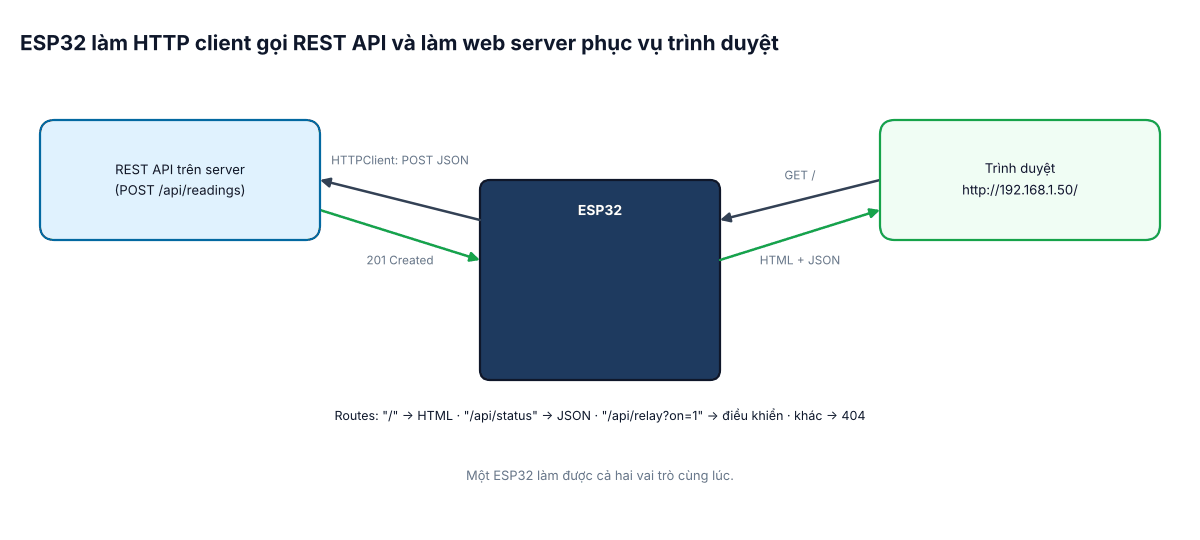
2. HTTP client: gửi dữ liệu lên API
#include <WiFi.h>
#include <HTTPClient.h>
#include <ArduinoJson.h>

bool postReading(float t, float h) {
  JsonDocument doc;                          // ArduinoJson 7
  doc["device"] = "may-01";
  doc["temperature"] = t;
  doc["humidity"] = h;
  String body;
  serializeJson(doc, body);

  HTTPClient http;
  http.setTimeout(5000);                     // ms – không để treo lâu
  http.begin("http://192.168.1.10:8000/api/readings");
  http.addHeader("Content-Type", "application/json");
  http.addHeader("Authorization", "Bearer TOKEN_CUA_THIET_BI");
  int code = http.POST(body);
  bool ok = code >= 200 && code < 300;
  if (!ok) {
    Serial.printf("Loi HTTP %d: %s\n", code, code < 0 ? http.errorToString(code).c_str() : http.getString().c_str());
  }
  http.end();                                // luôn giải phóng
  return ok;
}

void setup() {
  Serial.begin(115200);
  WiFi.begin("XuongA", "matkhau123");
  while (WiFi.status() != WL_CONNECTED) delay(200);   // đơn giản cho ví dụ; xem bài #8
  postReading(28.4, 61.0);
}

void loop() {}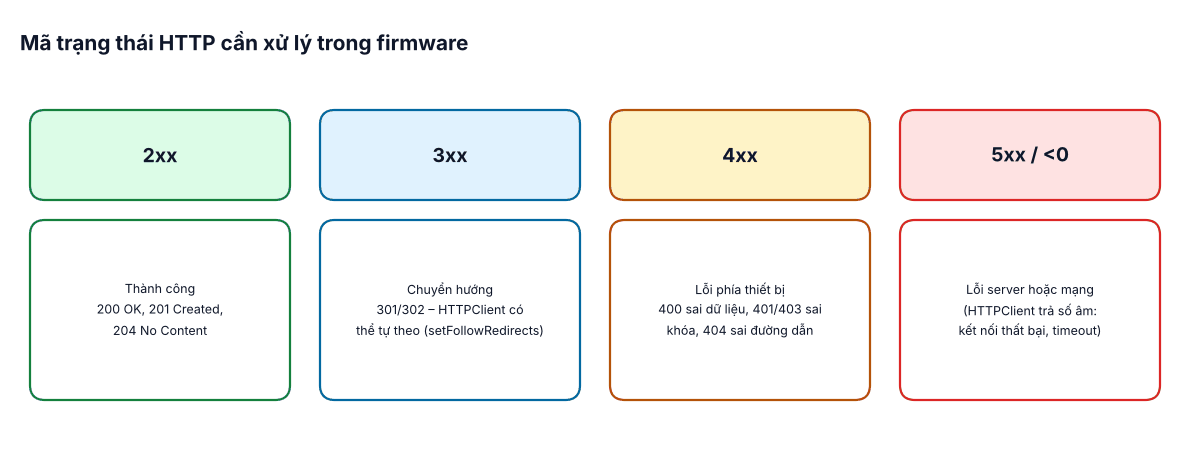
- HTTPS: dùng
WiFiClientSecurevàsetCACert()với chứng chỉ gốc của server;setInsecure()chỉ để thử nghiệm. - Gặp lỗi mạng hoặc 5xx: thử lại với thời gian chờ tăng dần; lỗi 4xx: không thử lại vô ích – sửa dữ liệu/khóa.
- HTTP mở kết nối mới mỗi lần, tốn ~vài trăm ms và năng lượng – phù hợp gửi thưa (vài phút/lần) hơn là liên tục mỗi giây.
3. Web server trên ESP32
#include <WiFi.h>
#include <WebServer.h>

WebServer server(80);
const int RELAY = 23;

const char PAGE[] PROGMEM = R"HTML(
<!doctype html><meta name=viewport content="width=device-width">
<h2>May 01</h2><p id=s>...</p>
<button onclick="fetch('/api/relay?on=1').then(u)">BAT</button>
<button onclick="fetch('/api/relay?on=0').then(u)">TAT</button>
<script>function u(){fetch('/api/status').then(r=>r.json()).then(j=>s.textContent=JSON.stringify(j))}u()</script>
)HTML";

void handleRoot() { server.send(200, "text/html", PAGE); }

void handleStatus() {
  String json = String("{\"relay\":") + digitalRead(RELAY) + ",\"rssi\":" + WiFi.RSSI() +
                ",\"uptime\":" + millis() / 1000 + "}";
  server.send(200, "application/json", json);
}

void handleRelay() {
  if (!server.hasArg("on")) { server.send(400, "text/plain", "thieu tham so on"); return; }
  digitalWrite(RELAY, server.arg("on") == "1" ? HIGH : LOW);
  handleStatus();
}

void setup() {
  pinMode(RELAY, OUTPUT);
  WiFi.begin("XuongA", "matkhau123");
  while (WiFi.status() != WL_CONNECTED) delay(200);
  server.on("/", handleRoot);
  server.on("/api/status", handleStatus);
  server.on("/api/relay", handleRelay);
  server.onNotFound([]() { server.send(404, "text/plain", "Khong tim thay"); });
  server.begin();
}

void loop() {
  server.handleClient();      // gọi thường xuyên
}
Trang HTML nhỏ có thể nhúng thẳng trong code như trên; giao diện lớn (CSS, JS, ảnh) nên lưu trên LittleFS và phục vụ bằng server.serveStatic(). Cần cập nhật số liệu liên tục mà không tải lại trang – xem bài #11 (WebSocket).
4. HTTP hay MQTT?
| Nhu cầu | Nên dùng |
|---|---|
| Gửi dữ liệu liên tục, nhiều thiết bị, nhận lệnh tức thì | MQTT |
| Gọi dịch vụ có sẵn (Google Sheets, Telegram, server REST của công ty) | HTTP client |
| Người dùng điều khiển trực tiếp trong mạng LAN qua trình duyệt | Web server |
| Tải file lớn (firmware OTA, cấu hình) | HTTP(S) |
5. Bảo mật và lỗi thường gặp
- Web server trên ESP32 không có xác thực mặc định – ít nhất dùng
server.authenticate()(Basic Auth) trong LAN; không mở cổng ra Internet. - Quên
http.end()→ rò bộ nhớ sau nhiều lần gọi. - Dùng
delaydài trongloop()→ web server phản hồi chậm. - Tạo chuỗi String lớn liên tục → phân mảnh heap; theo dõi
ESP.getFreeHeap().